
CJE in Action
You understand why your metrics lie. Follow a calibrated comparison and inspect what remains unresolved.
Run it yourself, no installation required.
Open in Colab →Start with a synthetic comparison, then inspect uncertainty and held-out transport evidence.
1. Calibration
Your cheap judge scores (S) don't match expensive oracle outcomes (Y). CJE learns the S→Y mapping from a probability-sampled labeled slice. Reuse depends on whether that mapping applies to the target population.
from cje import analyze_dataset

# Two policies, gpt-5.6 vs fable-5, each answered the same 20 prompts.
# A separate fixed judge model scored all 40 responses; human raters
# labeled a random half of gpt-5.6's (None = not labeled).
judge_scores = {
    "gpt-5.6": [0.62, 0.68, 0.72, 0.76, 0.79, 0.83, 0.85, 0.88, 0.91, 0.95,
                0.64, 0.69, 0.73, 0.77, 0.80, 0.84, 0.87, 0.89, 0.92, 0.94],
    "fable-5": [0.70, 0.74, 0.75, 0.78, 0.81, 0.83, 0.86, 0.90, 0.93, 0.94,
                0.72, 0.76, 0.79, 0.80, 0.84, 0.85, 0.88, 0.89, 0.91, 0.95],
}
human_labels = [0.55, 0.60, 0.70, 0.74, 0.75, 0.80, 0.90, 0.92, 0.88, 0.97,
                None, None, None, None, None, None, None, None, None, None]

# gpt-5.6's labeled slice calibrates the judge for BOTH policies. Reusing
# that map for fable-5 is an assumption; the output flags it as
# "residual transport NOT_CHECKED" until a held-out probe audit grades it.
draws = {
    "gpt-5.6": [
        {"prompt_id": f"q{i:02d}", "judge_score": s, "oracle_label": y}
        for i, (s, y) in enumerate(zip(judge_scores["gpt-5.6"], human_labels))
    ],
    "fable-5": [
        {"prompt_id": f"q{i:02d}", "judge_score": s}
        for i, s in enumerate(judge_scores["fable-5"])
    ],
}
results = analyze_dataset(fresh_draws_data=draws)
print(results.summary())
CJE Estimation Results (method: calibrated_direct) fable-5 0.824 95% CI [0.766, 0.882] gpt-5.6 0.786 95% CI [0.706, 0.866] Best by point estimate: fable-5 Limitations: residual transport NOT_CHECKED Status: warning
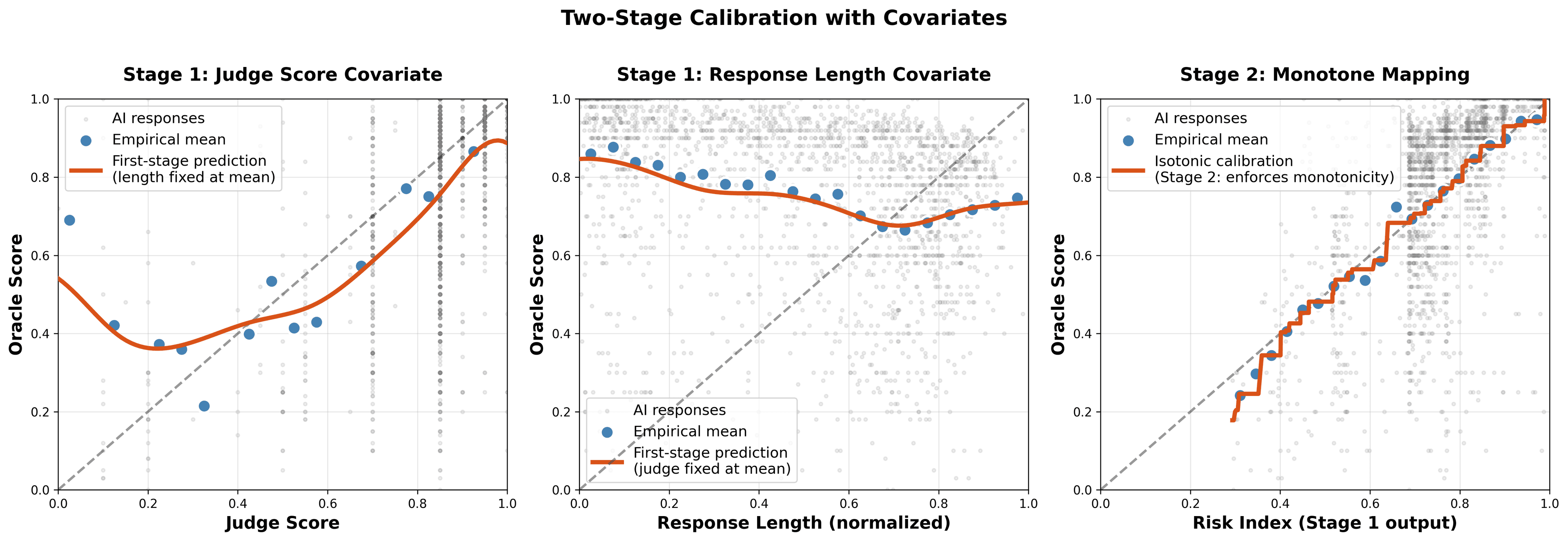
Two-stage calibration: learn flexible S→Y mapping, then ensure monotonicity.
The example has 20 shared prompts and 10 labeled prompt clusters. The second policy uses the shared calibration map without labels of its own, so transport remains NOT_CHECKED. This demonstrates the API; choose real sample and label budgets for the precision and audit power you need.
2. Uncertainty Quantification
Intervals around raw judge means miss judge-to-oracle bias. CJE includes sampling and finite-label calibration uncertainty on supported inference paths. Plotting requirespip install "cje-eval[viz]"; the summary and comparisons work with the core install.
# Visualize with confidence intervals
results.plot_estimates(
    policy_labels={
        "gpt-5.6": "gpt-5.6",
        "fable-5": "fable-5",
    }
)

# Paired difference and CI; marginal CI overlap is not an equivalence test.
comparison = results.compare_policies(0, 1)
print(comparison)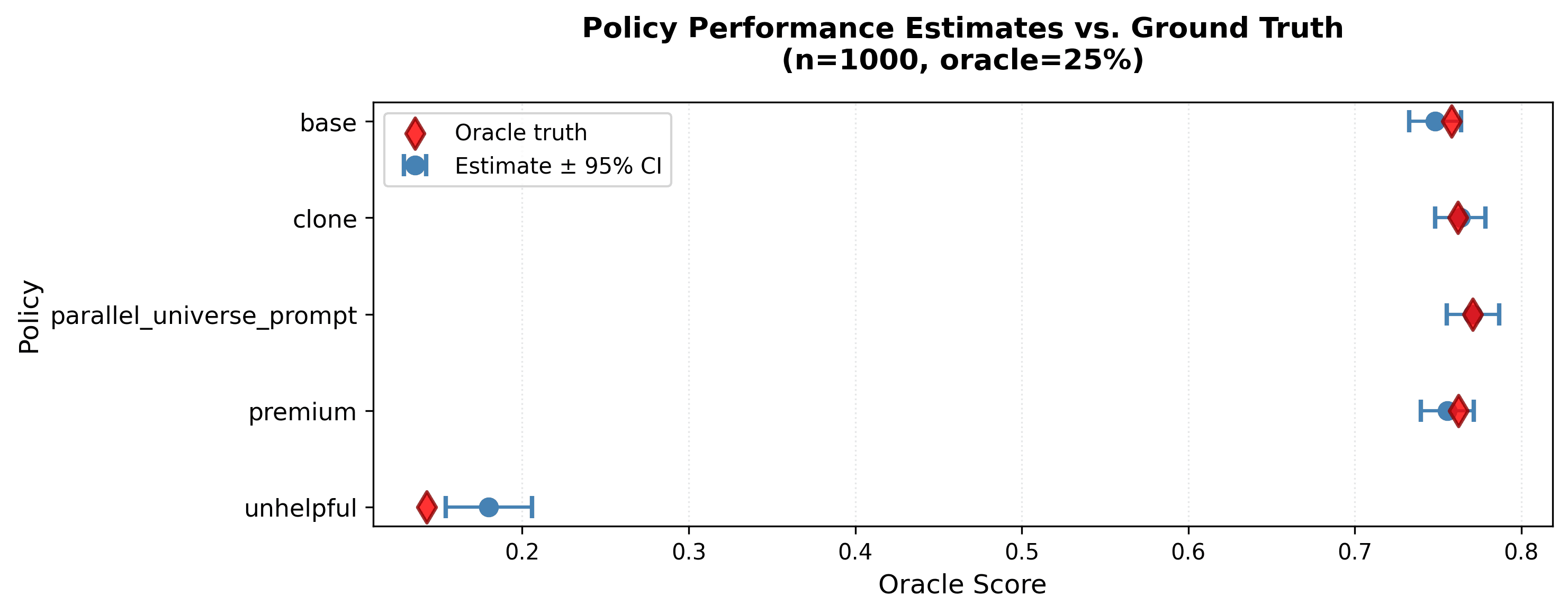
Arena benchmark illustration. Inspect paired differences, gates, and assumptions when comparing policies.
Interpret intervals under the sampling and calibration assumptions. Monotonicity alone does not guarantee coverage or transport. A nonsignificant difference is not equivalence; equivalence needs a predeclared practical margin and suitable interval evidence. Check the assumptions →
3. Transportability Auditing
Calibration drifts. User behavior changes, models get updated, prompts evolve. Use held-out probes to check calibration reuse. First declare how much drift your decision can tolerate: a margin (delta_max) in the units of your outcome. Plan probe size and the family of analyses before collection.
The following template expects week1_data, week2_data, andweek3_data as lists of held-out oracle-labeled response records in [0, 1] units, matching this example. Each probe needs independent prompt clusters and a documented probability design. Refit saved two-stage calibrators from before 0.8.0 before reuse.
from cje.diagnostics import audit_transportability, plot_transport_comparison

# Declare the drift you can tolerate, in outcome units.
# Without delta_max the audit is descriptive only (NOT_GRADED).
DELTA_MAX = 0.05

# Weekly check: does calibration still hold within the margin?
# family_size=3: Bonferroni across the three audits read together
audits = {
    "Week 1": audit_transportability(results.calibrator, week1_data,
                                     delta_max=DELTA_MAX, family_size=3),
    "Week 2": audit_transportability(results.calibrator, week2_data,
                                     delta_max=DELTA_MAX, family_size=3),
    "Week 3": audit_transportability(results.calibrator, week3_data,
                                     delta_max=DELTA_MAX, family_size=3),
}

for name, audit in audits.items():
    print(audit.summary())  # PASS, FAIL, or INCONCLUSIVE vs the margin

# Visualize drift over time
plot_transport_comparison(audits, title="Weekly Calibration Check")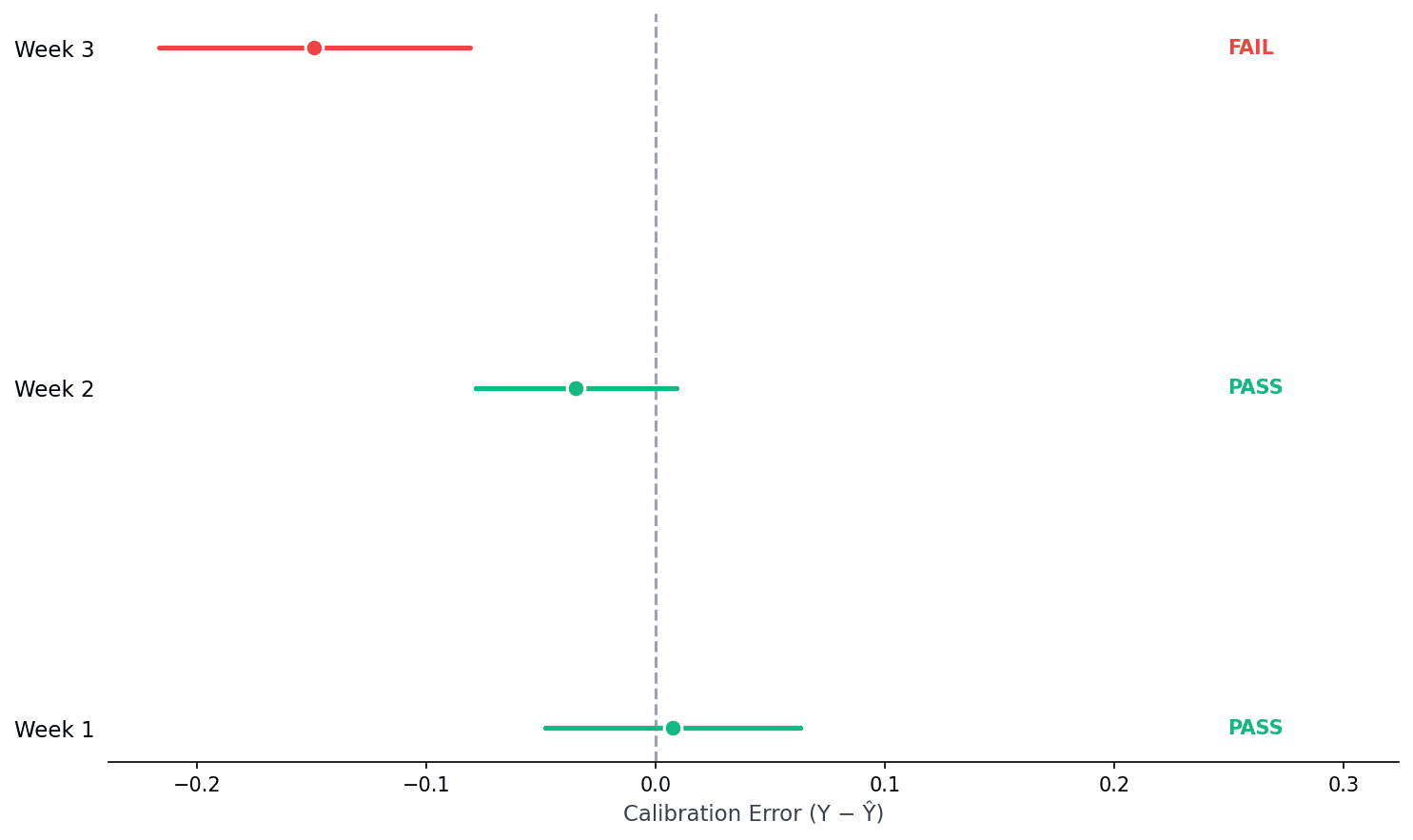
PASS = the residual CI sits wholly inside your margin, supporting mean-residual equivalence in the audited population.
FAIL = the CI sits wholly outside the margin, time to recalibrate.
INCONCLUSIVE = the CI straddles the margin boundary, the probe can't tell yet.
The five audit states
- PASS — CI wholly inside ±
delta_max. Needs at least 20 effective probe clusters; small probes can't certify a pass. - FAIL — CI wholly outside the margin. Graded even from a small probe: a decisive interval is evidence of bias, not low power.
- INCONCLUSIVE — CI overlaps the margin boundary, or too few clusters. Review the planned sample size or use an appropriate sequential design.
- NOT_GRADED — no
delta_maxdeclared. Descriptive only; can never pass or fail (the library warns you). - NOT_CHECKED — recorded by
analyze_datasetfor policies you gave no probe.
Wired into analyze_dataset(transport=TransportAuditConfig(...)), margins are in output units (the units of results.estimates), and only an observed FAIL adds a hard gate when the current estimate depends on that calibration map. NOT_CHECKED and INCONCLUSIVE surface as visible limitations, not failures.
When calibration fails
Week 3 shows systematic bias beyond your margin. The judge overestimates quality. This could mean user expectations shifted, the model changed, or adversarial patterns emerged. Representative target labels can also support correction of the current estimate; labels passed only as audit probes do not change it. See the correction guide.
Bonus: Debugging Failures
When calibration fails, you need to know why. CJE lets you inspect which samples the judge gets most wrong. Find the adversarial patterns, sycophantic responses, or edge cases fooling your evaluator.
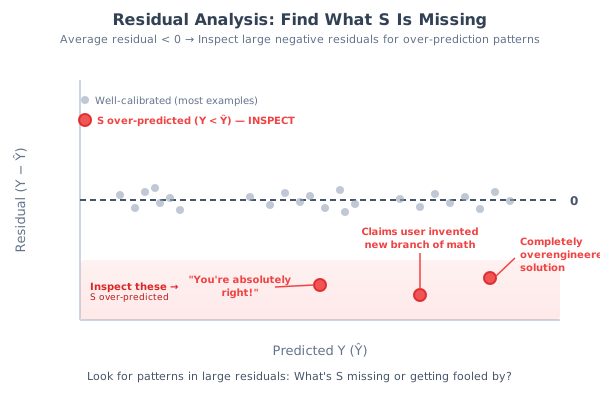
Large negative residuals = judge overestimated quality. Inspect these first.
from cje.diagnostics import compute_residuals

# probe_data is a list of oracle-labeled records in the same units.
# Find samples where judge overestimates quality (sorted by worst first)
samples = compute_residuals(results.calibrator, probe_data)

# Inspect the worst offenders
for s in samples[:3]:
    print(f"Residual: {s['residual']:.2f}")
    print(f"  Judge: {s['judge_score']:.2f} → Calibrated: {s['calibrated']:.2f}")
    print(f"  Oracle: {s['oracle_label']:.2f}")
    print(f"  Prompt: {s['prompt'][:80]}...")
    print(f"  Response: {s['response'][:80]}...")
    print()
Negative residuals mean the calibrated prediction exceeds the oracle label. These are your failure modes: responses that look good but aren't. Use these patterns to guide follow-up evaluation; validate any new fit on held-out data.
That's It
Calibration
S → Y mapping
Uncertainty
Honest CIs
Transportability
Drift graded vs. your margin
Save the inputs, label design, package and judge versions, comparisons, and audit states with the analysis.
Run Locally
pip install "cje-eval[viz]" notebook
git clone https://github.com/cimo-labs/cje.git
cd cje/examples
jupyter notebook cje_core_demo.ipynb
Go Deeper
Benchmark Paper
Canonical empirical results on 5k Arena prompts
Assumptions
When does CJE work?
Data Format
Full docs on GitHub
Full Tutorial
Interactive Colab notebook
Try it now
Open in Colab →